New: bill check and an order card to show staff

No menu is scary
anymore.

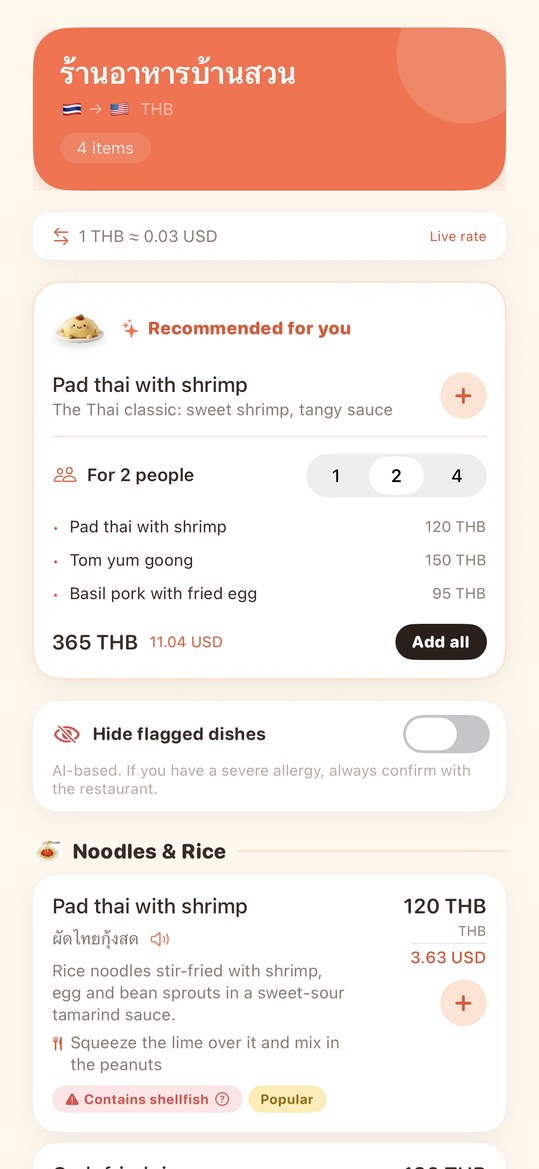
Snap a menu and every dish name, description and price appears in your language. Allergy alerts, an order card to show staff, and a check of the bill — everything that makes eating abroad stressful, handled.

14 languages·One-time purchase, no subscription·First 5 scans free
Menufy translation result screen
How it works

Snap, pick, and show.

No setup to speak of. Point the camera and the first dish appears in seconds.

01

Snap the menu

Paper, chalkboard or tablet. The language and currency are detected for you.

02

Read and pick

Names, descriptions and prices arrive dish by dish, with picks and set suggestions for your party size.

03

Show the staff

Your dishes and your allergy statements become an order card in the local language. After the meal, check the bill.

The app

Everything, a few taps away.

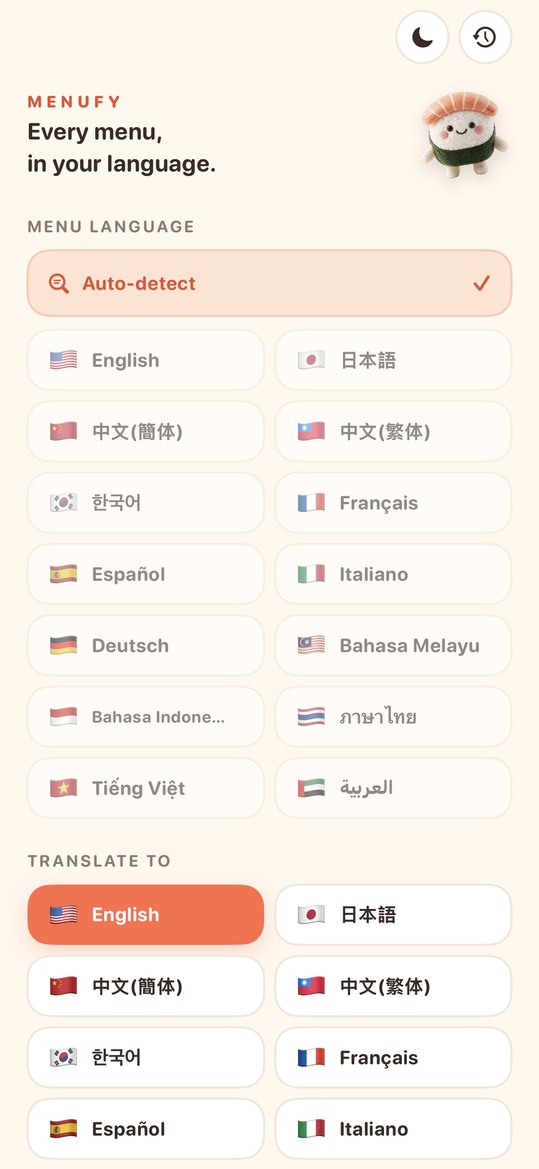
The only settings are your language, currency and dietary needs. Then it is snap and pick.

Menufy home screen
01. Set your language and dietary needsMenu language and currency are auto-detected
Menufy result screen
02. Dishes arrive one by oneWith picks, warnings and how to eat
Menufy order card
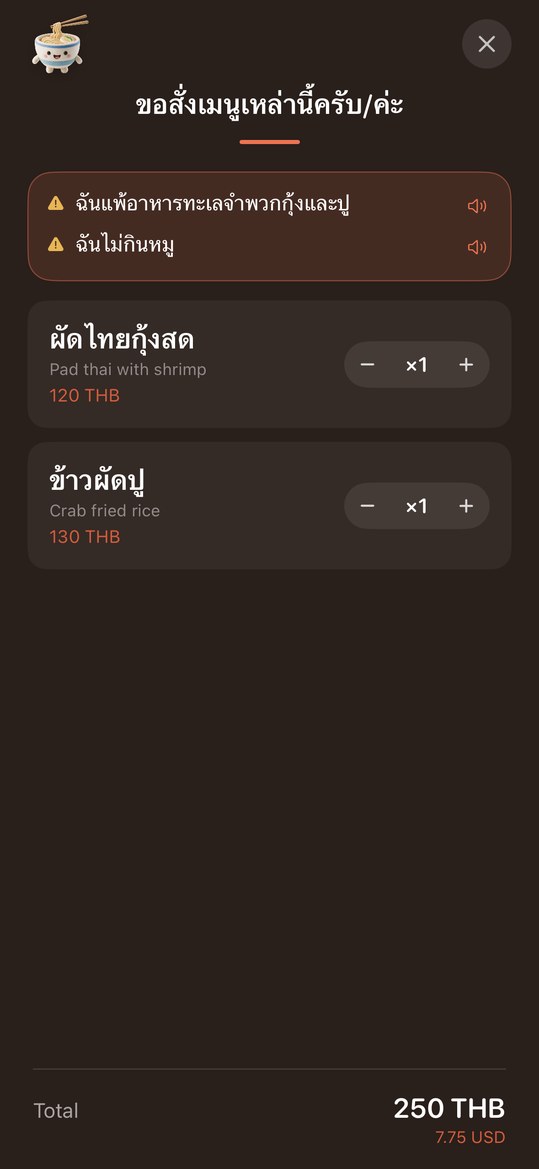
03. Show the order cardAllergy statements in the local language
Ask-staff card
04. Ask about a dish"Does this contain…?" in the menu's language
Menufy bill check
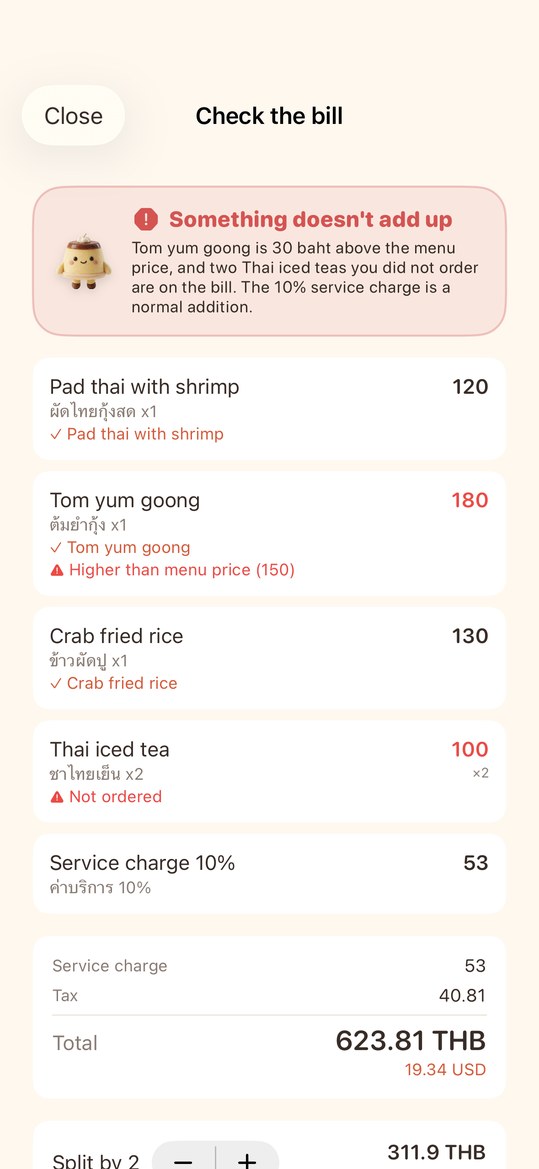
05. Check the billOvercharges and unordered items flagged
Menufy credit packs
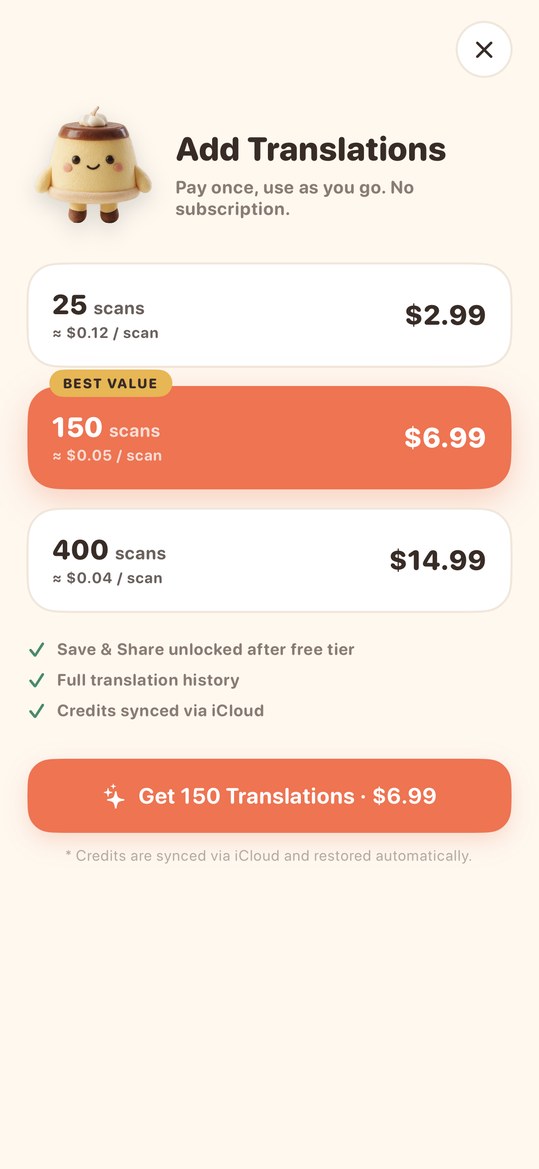
06. One-time credit packsNo subscription. First 5 are free
Scroll sideways
Features

Reading is only the start.

Choosing, ordering, paying and remembering — all in one app.

14 languages, auto-detected

The menu's language and currency are recognized for you. Only your own language needs setting.

Prices in your currency

Live conversion; the last rate keeps working offline.

Dietary alerts

11 needs from allergies to halal. Conflicting dishes get a warning tag plus a question to ask the staff.

Order card for staff

Your dishes and allergy statements, full screen, in the local language. Read aloud too.

Picks for this place

Three dishes worth ordering, plus sets for 1, 2 or 4 people. Spice, portion and how to eat.

Bill check

Photograph the receipt and every line is matched to your order: unordered items, overcharges, service charge.

Food log and trip card

Rate dishes with a photo, then share one card per trip.

Save, share, history

Save results as an image. Search history by restaurant or country.

Why Menufy

Where translators stop short.

A free translator swaps words. Menufy takes over after "I can read it".

REASON 01

It understands dishes, not words

General translators translate text. Menufy understands each dish and puts name, description, price and warnings on one card.

REASON 02

Built for safety

Register allergies or religious needs and you get warning tags and questions for the staff. The order card states them for you.

REASON 03

It handles ordering and paying

Order without speaking, with a local-language order card. After the meal, one photo of the receipt catches billing mistakes.

REASON 04

Pay once, no subscription

No monthly fee. Buy only the scans you need. The first 5 are free.

September 2026 update

Ordering and paying, without the worry.

Two headline features: a bill check, and an order card that states your allergies for you.

Bill check

BILL CHECK

Photograph the receipt after the meal and every line is checked against your order and the menu prices. Unordered items, prices above the menu, service charge and tax are explained — with questions to ask the staff.

Order card with your allergies

POINT-TO-ORDER

Your selected dishes become an order card in the local language. Your dietary settings turn into statements like "I have a shellfish allergy" at the top of the card, with a speaker button for pronunciation.

Pricing

Try it free. Upgrade if you love it.

Download and your first 5 scans are free. No subscription — buy only what you use.

Starter Pack
For a weekend trip
25scans
¥500
$2.99
✓25 scans, translation or bill check
✓Currency, picks and order card
✓Unlimited history
✓Save, share and trip cards
Get on App Store Get on Google Play
Explorer Pack
For heavy users abroad
400scans
¥2,500
$14.99
✓400 scans, translation or bill check
✓Currency, picks and order card
✓Unlimited history
✓Save, share and trip cards
Get on App Store Get on Google Play

Download and try your first 5 scans free.

Languages

Menus from around the world.

From Asia to Europe and the Middle East. The menu's language is detected automatically.

🇯🇵Japanese日本語
🇺🇸EnglishEnglish
🇨🇳Chinese (Simplified)中文(简体)
🇹🇼Chinese (Traditional)中文(繁體)
🇰🇷Korean한국어
🇫🇷FrenchFrançais
🇪🇸SpanishEspañol
🇮🇹ItalianItaliano
🇩🇪GermanDeutsch
🇲🇾MalayBahasa Melayu
🇮🇩IndonesianBahasa Indonesia
🇹🇭Thaiภาษาไทย
🇻🇳VietnameseTiếng Việt
🇦🇪Arabicالعربية
FAQ

Your questions, answered.

How accurate is the translation?
Menufy uses the latest AI to deliver high-accuracy translations across printed menus, handwritten menus, chalkboards, and digital tablets. Beyond just dish names, it also explains ingredients and cooking methods so you know exactly what you're ordering.
Does it work offline?
An internet connection is required for AI translation. Wi-Fi or cellular data both work. The last exchange rate is kept on the device, so history conversions still show offline.
Is my privacy protected?
Photos you capture are used only for translation and are never stored on our servers. Translation history is saved on your device. We never sell or share your data with third parties.
Is this a subscription?
No — Menufy uses one-time purchases only. Credits you buy never expire, and there are no recurring charges or auto-renewals.
Can I use my credits on multiple devices?
Yes. Purchased credits sync automatically — via iCloud on iOS, and via your Google account on Android — so they are shared across all devices signed in with the same account and survive reinstalls.
Can I try it for free?
Yes — download the app and your first 5 translations are free. If you like it, choose from 25, 150, or 400 credit packs to match your travel style.
Can I use it with food allergies?
Yes. Register your dietary needs (vegetarian, vegan, halal, and common allergies — 11 options) and Menufy flags dishes that may conflict, and states your needs on the order card. Note: flags are AI-generated, so if you have a severe allergy, always confirm with the restaurant as well.
Can I order without speaking the language?
Yes. Select the dishes you want and Menufy shows a full-screen order card in the menu's own language — a polite request phrase, your allergy statements and your dishes. Just show your phone to the staff. A speaker button pronounces each line.
How does the bill check work?
Photograph the receipt after the meal. Every line is checked against your order and the menu prices: unordered items, prices above the menu, and the service charge and tax breakdown are flagged, with questions to ask the staff in the local language. One check uses one scan credit.
Do I have to pick the menu language and currency?
No. By default both are detected from the photo. If you want to pin them, choose a language or currency in settings and auto-detect turns off.
How is this different from Google Translate?
Menufy is built for menus. Instead of swapping words, it understands each dish and organizes descriptions, prices and warnings on one screen. Then it goes further: picks, an order card in the local language, and a bill check.
Testimonials

Loved by travelers around the world.

※ Real quotes from actual users

★★★★★

"After moving to Malaysia, local eateries finally make sense. Being able to convert prices on the spot is a game changer — I use it every day."

Y
Yuki T.
🇯🇵 Kuala Lumpur, resident
★★★★★

"Finally I can explore Japanese izakayas without stress. The translations are accurate and explain the cooking style too!"

M
Marco R.
🇮🇹 Visiting Tokyo
★★★★★

"Saved me during my Thailand trip. Street food menus are suddenly readable — I could order exactly what the locals were eating."

K
Kenji M.
🇯🇵 Visiting Bangkok

Make your next meal
a little more fun.

Start with 5 free scans.
If you love it, pick a pack that fits your trip.

Download on theApp Store
Get it onGoogle Play
✈️
Traveling? Try Tripfy too.Paste your booking confirmations and AI builds your itinerary. From the same team, on iOS.
See Tripfy →